I am now refering to this project as the "iProject" :)
Last week I met with the Educational Assistants (EA's) that will be using the devices with the three students participating in our 2012-2013 TLLP (The Use of Apple iPads and iPod Touches to Enhance the Learning of Autistic Students). We looked over the devices and I showed them the apps that I had downloaded for the students. Each student has an iPad assigned to them for the time being and the same will be done later on when iPod Touches are tested out.
Our grade 2 and grade 5 student took to the iPad immediately and welcomed the device. Their EA's report that they seem to be interested, engaged, and focused. Our grade 4 student has not taken to the iPad like the other students. At this time, he seems more interested in "playing" with the device and not with the learning. We are currently working through some ideas that will minimize the distraction that it seems to be causing him.
My initial thought went something like this, "Uh oh, what if this doesn't work for him?". After taking time to reflect I realize that this "tool" may not be a good fit for him. In fact, it would be ridiculous to believe that the iPad can solve all student problems in education. It is early in the project and a lot can happen between now and the spring. We shall continue to try different things and do what we can to engage our grade 4 student in a positive way to benefit his learning.
I look forward to reviewing our EA's reflective journals and report on their experience using their words. Stay tuned.
Learning/Teaching new fluencies/competencies & using technology innovatively to prepare students for the changing world they live in. 2016-2017 TLLP Connecting Kids and Classrooms. 2015-2016 TLLP Bringing ideas to life with 3D Technology. 2013-2014 TLLP using Chromebooks for Blended Learning and Teacher PD. 2012-2013 TLLP around the use of touch technology (iPad/iPod Touch) to enhance the learning of students with Autism.
Monday, October 29, 2012

Wednesday, October 17, 2012
Meeting the Needs of our Students with Autism Using iPads/iPod Touches - TLLP Update (Sept/Oct 2012)
Shortly after the school year started the people involved in our TLLP project came together to talk about the project and the role(s) they would play in helping our students learn and demonstrate their learning. I was responsible for this meeting and it was my pleasure to speak to the three Educational Assistants involved, the two Classroom Teachers, our Special Education Teacher, our Vice-Principal, and our Principal.
 One of the Mathematics expectations in the Measurement strand for our grade two student revolves around her ability to match money (coins) using visuals. There are many apps about money (coins) but they are all American and that is not going to help when we are responsible for teaching Canadian currency. Nevertheless, I have found an app and at the next stage - downloading them to the devices and trying them out - we will have to see if it is good enough for what we are looking to do with it.
On a brighter and more rewarding note, I was reviewing our grade 5 student's Science and Technology IEP page (I find myself constantly reviewing the IEP's of the students participating in the project), and realized that the expectations listed are about the human body. I then searched for "Human Body" apps in the iTunes store and found two apps that appear to be relevant and interesting.


Next steps involve downloading the apps to the devices and meeting with the Educational Assistants who work with our three students. It is very important that they feel comfortable enough with the devices and the apps so that they can spend their time/energy assisting the student and documenting their observations.
I now find myself doing the "work" before the "work" - searching for applications (apps) that mesh well with the curriculum expectations that the teachers have chosen as part of their student's Individual Education Plan (IEP). It is a painstaking task, but also a very rewarding one. Let me provide you with an example.
 One of the Mathematics expectations in the Measurement strand for our grade two student revolves around her ability to match money (coins) using visuals. There are many apps about money (coins) but they are all American and that is not going to help when we are responsible for teaching Canadian currency. Nevertheless, I have found an app and at the next stage - downloading them to the devices and trying them out - we will have to see if it is good enough for what we are looking to do with it.
On a brighter and more rewarding note, I was reviewing our grade 5 student's Science and Technology IEP page (I find myself constantly reviewing the IEP's of the students participating in the project), and realized that the expectations listed are about the human body. I then searched for "Human Body" apps in the iTunes store and found two apps that appear to be relevant and interesting.
Next steps involve downloading the apps to the devices and meeting with the Educational Assistants who work with our three students. It is very important that they feel comfortable enough with the devices and the apps so that they can spend their time/energy assisting the student and documenting their observations.
I look forward to the initial feedback that comes from the first encounters with the devices. I am eager to have our students in the "driver's seat" and look forward to the ride!
Thursday, September 27, 2012
Engaging Students in Writing via iOS Devices and Gaming Part #3
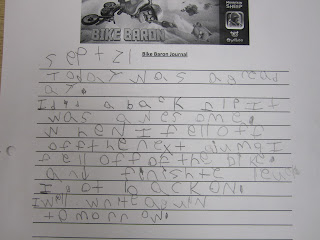
Since my last post, the students have collected information for their writing by playing the 'Bike Baron' game, written rough drafts of their entry, and have completed a good copy of their journal entry. Here are some samples of their work:


The students have worked hard on their writing. The use of the iOS devices (iPads/iPod Touches) in combination with the game provided them with enough excitement and interest to carry them through on many fronts.
The following journal entries were written by two students who have individual education plans (IEP's). Both of these students have difficulty with language literacy and told me that they "hate" to write. At first they were reluctant to write but after a while they felt comfortable enough to take risks and provide me with the 'effort' that I was looking for. I worked with them by meeting them where they were at and accepted and celebrated any of the writing they worked on.

The 'Bike Baron' video game in combination with the iPad/iPod Touch devices has proven to be fun and engaging. As I stated in the part#1 post, the students seemed to be excited in the beginning stages of this writing activity and they hadn't even touched a device yet. They were hooked by the main character (Bike Baron) as they brainstormed about who he was and what he was doing. As they moved through the writing process they had opportunities to play the game and collect information that would eventually lead to their 'journal entry' writing task. We kept our writing time as light as possible with lots of descriptive feedback in order to minimize feelings of failure/disappointment and maximize success and growth. From my perspective this 'project' was fun for me to teach and observe and based on the journal entries I received, was beneficial to the writing development of my students.


The students have worked hard on their writing. The use of the iOS devices (iPads/iPod Touches) in combination with the game provided them with enough excitement and interest to carry them through on many fronts.
The following journal entries were written by two students who have individual education plans (IEP's). Both of these students have difficulty with language literacy and told me that they "hate" to write. At first they were reluctant to write but after a while they felt comfortable enough to take risks and provide me with the 'effort' that I was looking for. I worked with them by meeting them where they were at and accepted and celebrated any of the writing they worked on.


The 'Bike Baron' video game in combination with the iPad/iPod Touch devices has proven to be fun and engaging. As I stated in the part#1 post, the students seemed to be excited in the beginning stages of this writing activity and they hadn't even touched a device yet. They were hooked by the main character (Bike Baron) as they brainstormed about who he was and what he was doing. As they moved through the writing process they had opportunities to play the game and collect information that would eventually lead to their 'journal entry' writing task. We kept our writing time as light as possible with lots of descriptive feedback in order to minimize feelings of failure/disappointment and maximize success and growth. From my perspective this 'project' was fun for me to teach and observe and based on the journal entries I received, was beneficial to the writing development of my students.
Saturday, September 15, 2012
Engaging Students in Writing via iOS Devices and Gaming Part #2
Since my last post, the students and I have continued our work with the 'Bike Baron Journal Entry Activity' by creating our learning goal & success criteria, "How to Write a Journal Entry" anchor chart, and a model/exemplar of a journal entry.
Here is our learning goal and success criteria:

We then moved on to talk about what a good journal entry would include. After a great discussion, we created the following anchor chart:

With a plan of action in place and an idea of what they are going to create, I model how the game is played and how they are to document what happens in the game in order to have information to create their journal entry. Using the document camera, I placed the iPad underneath it and projected my screen onto the whiteboard. The students were 'focussed' on the white board and very interested in what I was about to do. I asked if they wanted to watch me play a level or two without analysis - they agreed that it would be a good idea! As I played they talked to each other about what was happening, laughing at appropriate times, and gasping for air as I crashed.
It was finally time to get back to 'business'. I made sure to have a pen and paper at the ready to jot brief notes as I played (I would either "stop" the bike or crash in order to write notes). Here are some screen shots from the iPad as I played (in order):


Here is our learning goal and success criteria:

We then moved on to talk about what a good journal entry would include. After a great discussion, we created the following anchor chart:

With a plan of action in place and an idea of what they are going to create, I model how the game is played and how they are to document what happens in the game in order to have information to create their journal entry. Using the document camera, I placed the iPad underneath it and projected my screen onto the whiteboard. The students were 'focussed' on the white board and very interested in what I was about to do. I asked if they wanted to watch me play a level or two without analysis - they agreed that it would be a good idea! As I played they talked to each other about what was happening, laughing at appropriate times, and gasping for air as I crashed.
It was finally time to get back to 'business'. I made sure to have a pen and paper at the ready to jot brief notes as I played (I would either "stop" the bike or crash in order to write notes). Here are some screen shots from the iPad as I played (in order):


Can you see why my students are so interested and engaged? The graphics are fantastic and the game is so easy to play. The boys and girls appear to be equally excited.
After playing an "official" level, we talked about my notes (a few items were written down) and we created the following model/exemplar that would guide them as an acceptable journal entry:

Based on our "How to Write a Journal Entry" anchor chart I created a graphic organizer that they will use to make their notes/rough work as they play. The next step in this process is for the students to get their hands on the devices and play the game in order to gather information for their journal entries. The students will work in groups of two using either an iPod Touch or an iPad in the next portion of this writing task.
Stay tuned for a blog post about how the students progress towards their learning goal!
Sunday, September 9, 2012
Engaging Students in Writing via iOS Devices and Gaming Part #1
Even though school has only been in session for a week, it looks like I have hooked my students into an activity that has caught their attention and given them some motivation to engage in some writing tasks.
Late last school year I read a blog post by David Andrews, a grade 6 teacher in the U.K.. David wrote about "Raising Standards in Boys' Writing using the iPad for Gaming" using a game called Bike Baron on the iPad. He followed up with a post entitled "Raising Standards in Boys’ Writing using the iPad for Gaming: Outcomes and Ways Forward". David's work caught my attention because the class I had last year would have seized this type of activity - both for the gaming component and the writing task. We had worked together to improve their writing and they enjoyed the integration of technology in our classroom community. If it wasn't for the fact that the end of our school year had arrived, I would have looked further into planning my teaching and their learning.
I recently came across an article entitled "Video Games in the Classroom: Building Skills in Literacy and Numeracy" by Drs. Emmanuel Duplàa and Shervin Shirmohammadi. I was pleased to read such positive information about Video Games from a document coming from the Ministry of Education in the Province which I teach in. Having read this article, I decided to move forward with a plan to teach my students how to write a journal entry using Bike Baron.
I recently showed the following picture to my students to help them with a brainstorming activity aimed to assist them with an idea development expectation:
The students engaged in this activity in a way that really impressed me. I would say that it caused a rich discussion and a lot of useful data came from it. We recorded their ideas and they set off to brainstorm who this character might be and what he might be up to. As my students worked, I could instantly identify my writers and non-writers - providing me with valuable diagnostic data. The next day we revisited the Bike Baron via an interactive whiteboard lesson that was more detailed and provided the students with more information to revise their work.
Late last school year I read a blog post by David Andrews, a grade 6 teacher in the U.K.. David wrote about "Raising Standards in Boys' Writing using the iPad for Gaming" using a game called Bike Baron on the iPad. He followed up with a post entitled "Raising Standards in Boys’ Writing using the iPad for Gaming: Outcomes and Ways Forward". David's work caught my attention because the class I had last year would have seized this type of activity - both for the gaming component and the writing task. We had worked together to improve their writing and they enjoyed the integration of technology in our classroom community. If it wasn't for the fact that the end of our school year had arrived, I would have looked further into planning my teaching and their learning.
I recently came across an article entitled "Video Games in the Classroom: Building Skills in Literacy and Numeracy" by Drs. Emmanuel Duplàa and Shervin Shirmohammadi. I was pleased to read such positive information about Video Games from a document coming from the Ministry of Education in the Province which I teach in. Having read this article, I decided to move forward with a plan to teach my students how to write a journal entry using Bike Baron.
I recently showed the following picture to my students to help them with a brainstorming activity aimed to assist them with an idea development expectation:
 |
| http://itunes.apple.com/gb/app/bike-baron/id433847884?mt=8&uo=4 |
 |
| 5 W's to assist with idea development |
 |
| More pictures of the Bike Baron with the middle one linked to a You Tube video of the Baron in action.
The students set off again to do some brainstorming - this time they had an anchor chart to refer to in order to get more information that they had discussed with a partner (elbow partners) and with the class.
The next day I came at them with a little more information to "prime" them around the writing task that we would undertake. I told them a story, made up by me, that the Bike Baron has a journal and writes in it after completing missions (levels in the game). I asked them if they would be interested in pretending to be the Bike Baron (point of view expectation) and write a journal entry (form of writing) after playing a bit of the game. They thought it was a great idea! :)
Moving forward, the plan is to create a formal learning goal and success criteria to go with it. We need to learn how to write a journal entry and have a model for what all of this will look like. The plan at the moment is to document what our goal is and how we are going to get there. We will share the experience together before I set them off to do it on their own. We will create our anchors and we will play the game and learn to document the required information to create our journal entry. My fingers are crossed and look forward to letting you know how it goes.
*I would like to note that none of my students have laid a finger on an iPad/iPod Touch and played this game in class. Everything I have written about above has been accomplished based on the pictures I have posted and the discussions we have had in class. The fact that they are as excited as they are without having even seen the game or the devices brings a smile to my face*
I welcome your comments/thoughts!
|
Saturday, August 18, 2012
Why integrate technology in the classroom / curriculum?
As a teacher and a parent, I believe that we want our students to have opportunities to acquire and/or improve upon the skills that they need to be successful today, and tomorrow. Among other things, students need to be effective communicators who are confident, engaged, creative, collaborative, empowered, technologically literate, and are able to think about their thinking (meta-cognition).
Technology has revolutionized the way we think, work, and play. Integrating technology into the curriculum revolutionizes the learning process and provides our students with the preparation they require to be successful in our dynamic society. I have experienced, first hand, the improved student engagement and achievement that comes with appropriate integration of technology in the classroom & curriculum.
If my experience is not enough, simply look at the commitment my school board has made to integrating technology into the educational culture. Every classroom in my board has been equipped with BrightLink technology that allows for digital content to be presented to students and allows them the opportunity to interact with it. The step forward that my board has made will help students learn by emulating the technology they are familiar with and use every day.
It is no longer a surprise to hear about or see that most people are ‘connected’ (socially, physically, and emotionally). This ‘connection’ allows them to acquire knowledge easily and at their convenience. The technology is a tool that our students are familiar with. Integrating it into the classroom & curriculum shifts the focus from the tool to the critical thinking skills (e.g. problem-solving, use of information, etc) that have become a necessity in our ever changing globalized society.
Technology has revolutionized the way we think, work, and play. Integrating technology into the curriculum revolutionizes the learning process and provides our students with the preparation they require to be successful in our dynamic society. I have experienced, first hand, the improved student engagement and achievement that comes with appropriate integration of technology in the classroom & curriculum.
If my experience is not enough, simply look at the commitment my school board has made to integrating technology into the educational culture. Every classroom in my board has been equipped with BrightLink technology that allows for digital content to be presented to students and allows them the opportunity to interact with it. The step forward that my board has made will help students learn by emulating the technology they are familiar with and use every day.
It is no longer a surprise to hear about or see that most people are ‘connected’ (socially, physically, and emotionally). This ‘connection’ allows them to acquire knowledge easily and at their convenience. The technology is a tool that our students are familiar with. Integrating it into the classroom & curriculum shifts the focus from the tool to the critical thinking skills (e.g. problem-solving, use of information, etc) that have become a necessity in our ever changing globalized society.
Sunday, July 22, 2012
Twitter and my Self Directed PD
As I reflect upon the completion of my 11th year as an educational professional, I can't think of a better or more powerful PD tool than Twitter. Yes, you read that accurately, Twitter. When I tell my friends and colleagues this fact, they look at me in a way that makes me feel as though all my professional credibility is being stripped away. Nevertheless, I am leveraging Twitter to facilitate professional development (mine and others) and I am really enjoying doing so.
I have established a professional learning network and I am connecting with educators around the world everyday. The educators I am following are passionate about their teaching and learning. Many of these people have their own blogs where I can read about their practice and engage them in discourse around what they do, how they do it, and why they do it.
Here is an example of a conversation where one of the educators I follow tweeted about her blog, I read her blog post and included another individual in my reply, and was then tweeted back:
Both of the above mentioned individuals (K. Lirenman and Aviva Dunsiger) are progressive and often share their work on Twitter. They, among many other educators, have directly and indirectly influenced my attitudes and practice in my classroom - ultimately influencing my students positively and preparing them for the society they will lead.
Aside from being informed/directed to professional reading material, I have also been tweeting about the work that I have been doing in my classroom and the work that out TLLP (Teacher Learning and Leadership Program) team is engaged in.
Twitter has provided me with a forum to learn about, improve, and share my practice. It also allows me an avenue to interact with who I want (I choose who to follow) when I want (any time of day), and where I want (via mobile devices).
If you are on Twitter please feel free to check out my tweets (@Rchids). If you are not on Twitter, sign up and follow me....I will follow back!
 |
| This is a recent tweet about why I use Twitter. |
Here is an example of a conversation where one of the educators I follow tweeted about her blog, I read her blog post and included another individual in my reply, and was then tweeted back:
 |
| This is an example of how Twitter allows me to connect with others and to self direct my PD. |
Aside from being informed/directed to professional reading material, I have also been tweeting about the work that I have been doing in my classroom and the work that out TLLP (Teacher Learning and Leadership Program) team is engaged in.
 |
| This tweet informs my followers of the work my students and I were doing around writing and technology integration and where they can further read about it on my blog. |
 |
| This tweet directs my followers to my blog where they can read about out TLLP progress. |
If you are on Twitter please feel free to check out my tweets (@Rchids). If you are not on Twitter, sign up and follow me....I will follow back!
Subscribe to:
Posts (Atom)