Thursday, September 12, 2013

Introducing the Chromebook

Picture source http://www.pcmag.com/article2/0,2817,2419670,00.asp


I recently acquired the Chromebooks that my students will be using for their blended learning. From the moment I took possession of the devices, I have been thinking about the most effective way of introducing the Chromebooks to them. Having only known my students for 7 days I feel like I have a decent grasp of what I need to do in order to effectively reach them around the what the Chromebook is and how it works.

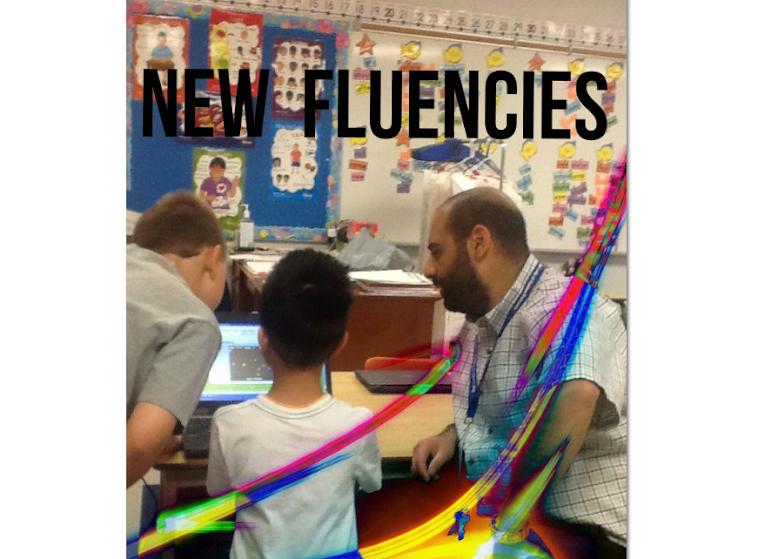
As a whole group, I took one of the devices out of the box and gave them a look at it. They immediately made comments about its size (how small it is) and wondered about its weight. I informed them that they would each have the opportunity to power one up and work with it in a small group setting. Since they are learning about the guided reading groups that we will be having in my class I decided to roll it into our guided reading time so that I could have a small group to work with as they practice being independently engaged in learning while I guide a small group in reading. 


During our guided reading time today, I started introducing the Chromebook. The four students I worked with seemed very interested and engaged while the rest of the class tried to focus on their given task (who could blame them?). I made sure to keep things as simple as possible - I didn't want to assume that they knew anything about the device. Needless to say, they were quick to pop it open and find the power button. Once the device powered up, the students faced their first difficulty. The devices automatically prompt the user to log into their Google account with no option to log in as a guest. Having talked to +Ferdinand Krauss, my project partner, he informed me that my students would have a Google log in at a later date in order to employ the benefits of our Google Apps for Education (GAFE) account. Since we were not able to log in as a guest, I taught the students how to access the wireless network using their Internet login and password which they need to access the desktop computers at school. At this point, a couple of the students could then log on  the device as a guest but the other two could still not. With the confusion that ensued we are not certain how they ended up having the option of logging on as a guest user.

Once the students were logged in as guests and logged on to the wireless network, I taught them how to launch Chrome (the browser). Once they were on the "net" I asked them where they wanted to go in order to practice using the volume control and the track pad (on board mouse pad) - they chose to practice at Cool Math Games . They practiced using the track pad - moving up and down the page and the use of the right and left click buttons. After a short time I taught them to close their window and power down the Chromebook. 

Picture source http://www.theregister.co.uk/2013/02/19/feature_chromebooks_head_to_head/


I asked them what their first impressions were and they said that they thought it was "cool". When I asked them to elaborate they said that they liked how small the device is and that they are excited to use it for their learning. 

I'm looking forward to working with my next small group tomorrow and I am really excited that we have started integrating the device in our classroom community. If you have any questions or comments, please feel free to leave a comment below or you can email me at rtwcdsb@gmail.com        

Tuesday, June 4, 2013

Wrapping up the iProject: Teacher Reflections (TLLP 2012-2013)

The teachers participating in the iProject (using iPads with students with Autism to enhance their learning) met today to talk about the professional learning we experienced, the successes, and the challenges of our 2012-2013 TLLP project.

In our discussion about our professional learning, we discovered that we had a lot in common about what we gained from our year long experience. We talked about how technology can be used in our classrooms to benefit student engagement, motivation, and focus. Aside from our professional learning around the technology, we realized that we had 1) accumulated a deep knowledge of how to effectively teach our students with Autism and 2) a deep awareness and interaction with our student's IEP.

This project allowed us to really examine the characteristics of our students and how to best use the iPads to enhance their learning. As we learned more about the common characteristics of Autism we also discovered the personalities of our students, which sparked more of an interest in learning how to better serve them. With respect to the IEP (which was the main force behind the apps we would choose for our students to engage with), it became a rich and dynamic document that was used daily rather than weekly or monthly. This project led to strong teacher-student-EA interaction which helped inform the creation and maintenance of the IEP.

When we talked about the successes of the project we immediately acknowledged the effective communication and collaboration we experienced with each other and our EA's. The team work we engaged in to meet our professional learning needs and the learning needs of our students was a rich experience that provided us with feelings of support and collegiality. Another success has been the engagement, motivation, and focus we have witnessed from our students. We have also noticed that the use of the technology has allowed two of our students to become more social in the way they use their device in the classroom community. It has provided them with a way to connect to other students in the classroom and to feel more involved.

When we talked about the challenges that we came across during this project it was clear that it was difficult for us to not be involved and understand everything that was going on with our iProject students. As we instruct and support the majority of our class, our EA's would be providing direct support with the students using the iPads. At times we felt like we were on the periphery of the project rather than being in the center with our EA and student. We realized that our challenge was more of an emotional/philosophical one rather than a logical one. We felt like we weren't "in charge" because we weren't sitting with our iProject student every minute of the day. With time and constant communication with each other and our EA's, we overcame our challenge by establishing a strong relationship and trust with our EA's.

Near the end of our discussion my colleagues expressed some interesting points about their experience with this project. They noted that they are not tech savvy and that they wished they could understand the technology better. They still seem to puzzled about what they referred to as the "abstractness" of the technology and how apps are found and loaded on to the iPad. They expressed concern in not understanding how all the "abstract" stuff come together and end up on the device. From my perspective, I think that they could benefit from actually participating in locating and actually downloading apps from the iTunes store right on to the device. They experienced a taste of this a while ago and after our discussion it is clear that it was not enough for them.

Overall, our reflections on the iProject are positive and it is our belief that the use of iPads with our students with Autism has been beneficial for both the students and the teachers. It has been a great year of professional and personal growth.

Friday, May 31, 2013

Chromebook in the Hands of Grade 2 Students

I recently acquired an Acer Chromebook to test out its capabilities for student and teacher use. I blogged about my initial response to the device here, where I discussed the Chromebook's ease of use and the possibilities it holds for blended learning with my students. Shortly after blogging, I handed the device over to the students to see what they would do with it and find out what they think.

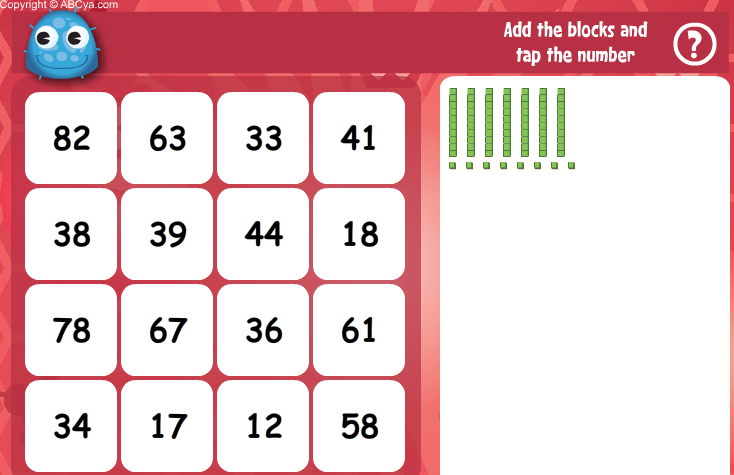
We were working on adding and subtracting with and without regrouping and the students had just been introduced to base ten blocks.


The students were presented with the task of adding and subtracting two digit numbers using base ten blocks. A few of my students found this task to be relatively easy so they were tasked with the responsibility of helping me discover on-line sites/activities that would allow us to blend their learning.

We found a great site that had two activities that we thought would be great for remediation and enrichment. Base Ten Fun and Base Ten Bingo  were deemed appropriate and were presented to the students. Using the Bright Links projector via the class desktop I introduced the two activities to the students and explained that they would all get a chance to use a 'computer' to try them out. As we progressed though our learning cycle the students got to use the various computers in our classroom (Chromebook, Laptop, Desktop) to try out the two activities.


The students knew that we wouldn't have the Chromebook for a long time so they all wanted to use it. I placed few limitations on its use - I wanted it to be treated with respect and survive its stay in our classroom. Every student had the opportunity to use the device and as they were using it I observed them and questioned them with respect to their mathematical learning and about the device.

The students loved how portable it was. Some of them sat at their desks and other laid down on the carpet. They liked that it wasn't plugged in and that they could walk around the room with it to show their friends what they were doing. They were happy to be "free" to move about the room. THEY commented that they don't like calling people over to the desktop or the laptop to look at their work, they prefer to simply go to the person they want to talk to - this includes me! Side note: there is nothing better than having many students want my attention at the same time to COMMUNICATE their THINKING.

Even though they are very careful and respectful with the computers, they commented that the laptop is too big and although they could walk around with it, I would probably not allow it. They are correct, the laptop is pretty hefty compared to the Chromebook and the iPads and iPod Touches that they use in class.

One of the students asked why we couldn't use the iPads to do this work. This question came from one of the students that was limited in mobility due to the use of the desktop computer. She wanted to find a comfy spot in the room to explore and enjoy. I explained that the iPads are not "Flash" compatible. The students wanted a demonstration so I showed them using our document camera. Due to the incompatibility with Flash based software I rarely, if ever, get the students to connect to the Internet when using the iPads and iPods. I logged on to the Internet with an iPad and showed them that we could not use the tablets to use the activities we found on the site.**

Here is what my students said about the Chromebook:
  • the screen is big enough to see what is going on
  • they like moving around with it, just like using the iPads/iPods
  • not trapped in an app, can move all over the Internet to get to different places
  • they can use sites that they use on the computer
  • they can use sites that they already know about (tvokids.com, starfall.com)
  • turns on quick
  • can move around the room easily
  • don't have to keep it plugged in
  • it is small and light
The Chromebook proved beneficial to my students while it was in our classroom. The key benefit is that it allows my students to use Flash based software that seems to be everywhere we want to be. For the purposes of our project, compatibility with Flash based software to start us off is key. My students did not have a chance to use any of the Ministry's online learning resources while we had the Chromebook in our possession (which are all Flash based by the way) but I did and everything worked fin. It is integral that we have a device that is compatible with the software used to create the learning resources that my students will be using. Moreover, the Chromebook is the perfect device for what +Ferdinand Krauss will be doing next school year with teachers. Ferdinand has blogged about his plan to leverage the Chromebook mainly with educators while my prime focus will be on blended learning with the students.

So far so good. My students only had one issue with the Chromebook - that they won't be in my class next year when I have once device for every two students!

______________________________
**I must admit that I have relied heavily on the use of apps with the tablets so I took it upon myself to research web browsers that I could download onto the iPads so that my students could use Flash based software. I downloaded the "Photon" Browser onto one of the iPads and then proceeded to the two online activities listed above. Sadly, we were still not able to load Flash based activities. We got a message that said something about installing the most recent Flash software. Although I am not easily dissuaded most of the time, I threw in the towel on this ongoing issue due to the fact that we have discovered a relatively affordable device that can do what we want and a lot more.


Wednesday, May 22, 2013

Chrome is as good as Gold!

+Ferdinand Krauss and I are on an exciting journey, one that we believe will lead students to success by employing 21st Century strategies and a blended learning model. Although our journey has just begun, we have already had to make some changes to our project.

One of the changes involves the device that we will leverage to benefit the learning of primary students and the professional development of teachers interested in using blended learning in their classroom. After extensive research and experimentation we realized that the Acer Chromebook would be the best suited device to support us in our above mentioned goals. 


We want our primary students and teachers to be able to view/experience on-line interactive sites, particularly Flash-based learning activities created by the Ministry of Education without having to change/configure any settings. We want their experience to be as seamless as possible with their focus squarely on the learning/teaching and not the technology. 

Enter the Chromebook: not complicated to learn, no expensive software to buy, and it starts in seconds. As I use a Chromebook to write this blog post I can attest to the simplicity of the device. The fact that it starts up in seconds and requires almost no set-up or maintenance is a dream. As a classroom teacher much of my  attention is placed on instructional time and I can see how this device will not take away valuable time from my teaching or student learning. 


The Chromebook is often referred to in a negative light because it is seen as, simply, a web browsing device. It is for this very reason that for +Ferdinand Krauss and I, Chrome is as good as gold! Blended learning is all about combining face-to-face classroom methods combined with "online" content and instruction. We want our students and teachers to engage with a device that will facilitate excellent and fast web browsing. The faster the better!! The web browser (Chrome) is a modern one that includes tools that allow standardized and easy deployment and management that are welcome in educational settings. 


Moreover, the Chromebook houses the best that Google has to offer. With respect to teacher professional development, Google Drive (file storage and synchronization service provided by Google which enables user cloud storagefile sharing and collaborative editing) and Hangout (places used to facilitate group video chatare just two examples of apps that facilitate collaboration and are easily accessible on the device. Combined with the speed of the device these two apps function very well and add to the positive experience. 


I look forward to blogging more about the the other capabilities of this device for the purposes of our project. Stay tuned to read more about our exciting journey!! 


Monday, May 20, 2013

Building Capacity via Self Directed Learning


I recently spent several days in Toronto with +Ferdinand Krauss for the Teacher Learning & Leadership Program. We spent our days learning the 'ins and outs' of the program, things like the fundamentals, project management/budgeting, and time to work on our project. This was my second time attending the training and even though I participated last year, the experience was not lost on me. In fact, I gained wonderful insight and "heard" things that didn't get absorbed last year. I looked forward to the training and was mentally ready to engage in it.

Informal discussions around integrating technology in the classroom, project design & implementation, digital resources, and social networking helped "stretch" my thinking and has caused much reflection on my part. In his TED Talk about motivation, Daniel Pink  mentions that one of the ways to engage people is by allowing them to self-direct their learning. The project we are working on, the professional learning network I am part of on Twitter, and the reading I engage in are all self directed and based on my professional needs and interests.


Essentially, I am building capacity by going after what I need and doing so with an open mind, prepared to deal with the critical questions and cognitive dissonance that comes my way. This is no easy task, but what makes it palatable is the understanding that it will make me a better teacher and leader.


As I reflect on the 2012-2013 TLLP that is coming to an end, I can't help but reflect on the learning that has occurred. I must admit that during my project there were times when I was not open or comfortable with the critical questions and dissonance that came my way. If my recent training experience is any indication of what is to come, I feel like I am better equipped to deal with what comes my way and do what I can to leverage it in order to continue to benefit my students, my colleagues, and myself.


Your comments are always welcome - please feel free to comment here or at rtwcdsb@gmail.com

Wednesday, April 24, 2013

Engaging Students using Video Messages

Many months ago I read about using video messages to "hook" student into the learning that they were going to do in class. I read about this on Twitter and I was intrigued. The idea comes from the fact that many people have smart phones that have video camera capabilities, so why not take short video of a real-life situation that can be used to engage students in their learning. I have played around with the idea and have tried it a couple of times but I didn't really feel good about it until today.

I was at the hockey arena on the weekend with my boys for their skating lessons and as they were doing their thing I couldn't help but wonder what my students would say if I asked them how they would measure the perimeter of the skating rink using non standard units. We are talking about perimeter right now so it seemed like a great opportunity for me to try this out without too much stress. The video is "raw" and impromptu so please don't be too harsh in your judgement. I fumble a couple of times and even use the word 'area' as I am trying to set it up for my students. My wife (who is also an elementary school teacher) commented on the 'flaws' of the video but I am sticking to the idea that it is an authentic video and that this whole process would not be so effective if things were planned and polished. Here is the video:


After watching the video the students worked with a partner to talk about what non standard units they could use tho measure the perimeter of the ice rink. After a couple of minutes we brought things back to the whole group and I recorded their ideas. We had a great discussion!

Here is what they came up with:


The students had a lot of fun with this! They enjoyed watching me talk to them about the math and they loved seeing all the items in the video that they could use to measure the perimeter of the ice rink.

I'm looking forward to trying this again! I hope that I can continue to catch real life experiences that I can use in the classroom to help engage my students in their learning. I already have some ideas to try and get them to make connections and work on point of view. I am also interested in asking richer questions/applying Blooms Taxonomy in order to reach my students where they are at and work with them to bump things up.

Tuesday, April 23, 2013

Plans Change, Shift Happens! (TLLP 2012-2013)


Tweet from Simon Sinek (April 23, 2013) - https://twitter.com/simonsinek
 I read this tweet this morning and it seemed to fit perfectly with what I have been experiencing with what I affectionately refer to as the iProject. There has been a lot of 'change' with the project - the only constant has been ME and my mentor. Nevertheless, I felt a strange comfort when I read Simon Sinek's message.

This project has taught me a lot about a variety of things, but what I am taking away from it today is how it has helped me transform into a better collaborator, communicator, and problem solver. While working on the project this morning I was wondering how my morning would go as I search for apps to assist our grade 2 student. Without question, each student is unique but usually there are similarities. All three of the students in this project are different and all of them are on a unique learning journey. One of our students is really doing well and able to meld a social aspect to it. Another student responds well to the use of the device but the social aspect is nearly non existent. Our youngest student has good days and bad days but has come a long way.

The main plan was to provide our students with an innovative way to meet their needs and help them learn and I am pleased to say that it has been happening, as we planned. Everything under the umbrella of the main plan has shifted and even changed. If someone had told me a year ago about all the changes that would come our way I would have laughed out loud and told them that what they were telling me would never happen.

I am 'ok' with what we have experienced throughout this journey so far and I look forward to the last couple of months as we lead our iProject students to success!