The EA's that work with our Autistic students have been doing a fantastic job on all fronts of this project. As they work with their student each day, they manage the use of the iPad, learn the apps that their student uses, interact with me, and document their thoughts/ideas/concerns in a journal. They are juggling many balls in the air and I am very appreciative of their time, effort, and enthusiasm.
To support them in their documentation of their experience, I provided the EA's with questions that act as prompts for reflection. Here are some of our grade 5 student's EA reflections.
Q: How are you doing with the implementation of apps?
A: I struggle with technology but I believe strongly that all our students need to be on top of technology to fit in the world. I wish I could spend more time learning to better teach my student.
Q: Can you gradually release the student with the iPad or with the apps?
A: The student is independent most of the time when using the iPad. He has one at home.
Q: What are some of the obstacles that your/your student face on a daily basis?
A: The apps cut out every now and again. Some apps don't work without an Internet connection. (NOTE: our school has wifi hot spots but that would mean that the student and EA would need to leave their portable to go to a hot spot. I have been informed that the student does not like to be away from his class/friends. He very much likes to be included.)
Further comments by the EA:
"When the student is on the right app he is engaged with the iPad, but if he doesn't like the app he will refuse to use it. The classroom teacher is awesome at allowing dedicated iPad time. The iPad is an awesome tool that will benefit the student in improving his basic math and reading skills."
Next step: I have invited the EA's to reflect on and summarize their experience over the last few months. I look forward to sharing their experience with you. More importantly, I look forward to working with them and the classroom teachers to set plans/goals for term 2.
If you have any questions or comments about this or other blog posts regarding our iProject, please feel free to comment here or email me at rtwcdsb@gmail.com.
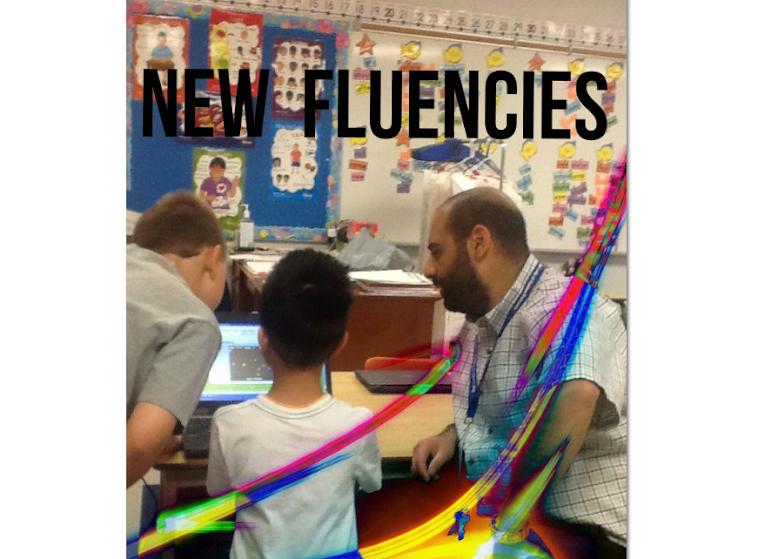
Learning/Teaching new fluencies/competencies & using technology innovatively to prepare students for the changing world they live in. 2016-2017 TLLP Connecting Kids and Classrooms. 2015-2016 TLLP Bringing ideas to life with 3D Technology. 2013-2014 TLLP using Chromebooks for Blended Learning and Teacher PD. 2012-2013 TLLP around the use of touch technology (iPad/iPod Touch) to enhance the learning of students with Autism.
Wednesday, January 30, 2013

Monday, January 14, 2013
Leveraging Technology for Diagnostic Assessment in Math
In Math my students are learning about Time. When it's all said and done, they are expected to be able to tell and write time to the quarter-hour, using demonstration digital and analogue clocks. Time is one of the concepts that my students have always had difficulty with. I used to think it was them - now I think it is me. Having spent some time reflecting on how I would teach them, I thought it would be beneficial to leverage iPads and iPod Touches to kick start their learning journey around the concept of Time.
My students have demonstrated great engagement and responsibility when using the above mentioned technology. Aside from some minor issues (ones that arise in any classroom) they show a focus and an eagerness to use the devices to their full potential. They make the most out of the time given to them with the idevices and they know how serious I am about using the "tools" to further their learning. For these reasons, I thought it would be appropriate to let them explore the concept of Time using some apps that I am familiar with to explore the concept. This would serve as a diagnostic assessment, providing me with valuable information about what the students know (prior knowledge), what they think they know (accurate and inaccurate), what they don't know, and what they seem to be interested in learning.
I put the students into groups of two and three (depending on the device they were using) and encouraged them to use "Wake the Rooster by Telling Time" and "Interactive Telling Time Lite".
Here are some of my notes about what I saw and heard as the students worked on the two apps.
The plan now is to provide the students with what they need to get them to our learning goal: tell and write time to the quarter-hour using demonstration digital and analogue clocks. The next step is to create an anchor chart that explicitly guides them in telling time. The students that 'get it' will assist in the creation of the chart and it is my hope that they will lead their classmates as we work together to move everyone forward.
My students have demonstrated great engagement and responsibility when using the above mentioned technology. Aside from some minor issues (ones that arise in any classroom) they show a focus and an eagerness to use the devices to their full potential. They make the most out of the time given to them with the idevices and they know how serious I am about using the "tools" to further their learning. For these reasons, I thought it would be appropriate to let them explore the concept of Time using some apps that I am familiar with to explore the concept. This would serve as a diagnostic assessment, providing me with valuable information about what the students know (prior knowledge), what they think they know (accurate and inaccurate), what they don't know, and what they seem to be interested in learning.
I put the students into groups of two and three (depending on the device they were using) and encouraged them to use "Wake the Rooster by Telling Time" and "Interactive Telling Time Lite".
Here are some of my notes about what I saw and heard as the students worked on the two apps.
- I heard students counting by 5's as they worked to figure out what minute the hand was pointing at
- I heard the students talking about the minute hand and the hour hand (few were able to explain any more than that)
- Many students were able to tell the time when it was on the hour (e.g. 6 o'clock)
- Many knew what a digital clock was but did not know what to call the "analog" clock
- Some students mixed up the hour hand for the minute hand and vice versa
- Most students can read a digital clock without difficulty
- A few of them can tell the time to the quarter hour and have an understanding of the terms "quarter after" and "quarter to"
The plan now is to provide the students with what they need to get them to our learning goal: tell and write time to the quarter-hour using demonstration digital and analogue clocks. The next step is to create an anchor chart that explicitly guides them in telling time. The students that 'get it' will assist in the creation of the chart and it is my hope that they will lead their classmates as we work together to move everyone forward.
Saturday, December 22, 2012
All it Takes is a Willingness to Engage and Learn
Anyone who works in an elementary school will tell you that their days are "full" and that there is always more that can be done. I have to admit that from time to time I get caught in the 'work' wave and go an entire day without having a decent conversation with any of my colleagues. Sad, but true.
As I was getting my students ready for afternoon recess, an occasional Educational Assistant came up to me and had some technology questions. She was told that I was the school's iPad "expert"! This was a nice way for us to break the ice and led to a moment of laughter. She told me that she would be in for a few days working with a student who is part of our project. She had already spent some time observing and supporting the student with the use of his iPad.
As an occasional EA, she is in different schools quite often and because of this fact she carries her RIM Playbook tablet with her to use with students. She wanted to know how she could download some of the iPad apps she saw our student using in order to support other students in numeracy and literacy. After a brief conversation about the iTunes store and the differences between the Playbook and iPad she realized why she couldn't load the apps that she had seen on the iPad. At that point I informed her of some of the benefits of using a Playbook rather than an iPad with students. I asked her if she was aware of the Ontario Educational Resource Bank (OERB) - an online repository that offers a growing number of free digital learning resources to teachers and students, from K-12. She was vaguely familiar with the OERB, that is to say that she had heard of it.
Recess was underway so I asked if she was free to chat and perhaps we could sit down at a computer with her tablet and explore the OERB together. She had the time, so we proceeded to navigate the Ministry based site and brainstormed/discussed how she could use her mobile device in combination with the learning objects to benefit the students she works with - no matter what school she finds herself in!
Our short collaboration was well spent. She left with enough knowledge to 1) access the OERB,
2) search for learning objects based on the needs of the student(s) she is working with, and 3) ideas to engage her student(s) and have them demonstrate their learning using her tablet.
If it weren't for her willingness to engage me in a discussion around how she could use touch technology with students, the great dialogue we had would not have been. I was more than happy to pass on what I have learned about using the Ministry's digital resource site to support our students and she was 'all ears' during our conversation.
I'm glad that the 'business' of my day didn't interfere with the opportunity to support one of my colleagues, especially one with such passion to assist her students using an interactive and blended approach.
I need to make the effort and time to engage my colleagues in meaningful conversation at least once a day. There is so much that can be gained outside the four walls of my classroom that can benefit myself and my students.
I welcome your feedback! Please feel free to comment here or email me at rtwcdsb@gmail.com if you want to engage me in converstion about what I have written.
As I was getting my students ready for afternoon recess, an occasional Educational Assistant came up to me and had some technology questions. She was told that I was the school's iPad "expert"! This was a nice way for us to break the ice and led to a moment of laughter. She told me that she would be in for a few days working with a student who is part of our project. She had already spent some time observing and supporting the student with the use of his iPad.
As an occasional EA, she is in different schools quite often and because of this fact she carries her RIM Playbook tablet with her to use with students. She wanted to know how she could download some of the iPad apps she saw our student using in order to support other students in numeracy and literacy. After a brief conversation about the iTunes store and the differences between the Playbook and iPad she realized why she couldn't load the apps that she had seen on the iPad. At that point I informed her of some of the benefits of using a Playbook rather than an iPad with students. I asked her if she was aware of the Ontario Educational Resource Bank (OERB) - an online repository that offers a growing number of free digital learning resources to teachers and students, from K-12. She was vaguely familiar with the OERB, that is to say that she had heard of it.
Recess was underway so I asked if she was free to chat and perhaps we could sit down at a computer with her tablet and explore the OERB together. She had the time, so we proceeded to navigate the Ministry based site and brainstormed/discussed how she could use her mobile device in combination with the learning objects to benefit the students she works with - no matter what school she finds herself in!
Our short collaboration was well spent. She left with enough knowledge to 1) access the OERB,
2) search for learning objects based on the needs of the student(s) she is working with, and 3) ideas to engage her student(s) and have them demonstrate their learning using her tablet.
If it weren't for her willingness to engage me in a discussion around how she could use touch technology with students, the great dialogue we had would not have been. I was more than happy to pass on what I have learned about using the Ministry's digital resource site to support our students and she was 'all ears' during our conversation.
I'm glad that the 'business' of my day didn't interfere with the opportunity to support one of my colleagues, especially one with such passion to assist her students using an interactive and blended approach.
I need to make the effort and time to engage my colleagues in meaningful conversation at least once a day. There is so much that can be gained outside the four walls of my classroom that can benefit myself and my students.
I welcome your feedback! Please feel free to comment here or email me at rtwcdsb@gmail.com if you want to engage me in converstion about what I have written.
Wednesday, December 12, 2012
Needle in a Hay Stack: Finding Great Apps for our Learners - TLLP
As I wrap up another 'formal' session of searching for appropriate apps to be used with our TLLP students, I can't help but reflect on a task that sounds so easy, yet can be so frustrating. I am constantly learning about apps that may be of benefit to our students. Google searches, the App Store (iTunes), and my Twitter feed keep me busy. There are lots of good apps out there, but for our purposes many of them get filtered out because they don't appear to be directly aligned with the needs of our students.
The lens with which I look through as I search for, and read about apps, is that of an IEP. When I see/read something that resonates with one of our TLLP student profiles/learning goals I will take a closer look at the app. I want to see screen shots of the app, how it might work, and how closely it fits with student program goals and learning expectations. From that point forward I will examine other factors like complexity, price, and how well it might integrate across curriculum, etc. For some apps, this process ends up being lightning fast and for some other apps the process is as quite slow. I will even seek the opinions of members of my Twitter PLN who seem to have extensive knowledge around educational apps.
Most of what I have described above occurs in isolation, within my mind. The true test occurs when the students interact with the apps. I am informed quite often whether an app is a good fit or not - this makes for some great learning. With our grade 4 student we recently discovered that the Mathopolis math operations app engages him, but for all the wrong reasons. In his case, this app renders itself useless. With our grade 5 student we have an app that allows him to record his thinking visually and orally. He loves the way it works and it is invaluable to him. The app can be used with almost any learning expectation in his IEP. It is proving to be a powerful app that integrates nicely across his IEP.
Finding the right apps involve time on my part and experience on the student's part. Just when I begin to think that there is a science to this, I realize that it is also an art. It usually feels like I am looking for a needle in a haystack! Nevertheless, I journey forward on this learning & leadership experience knowing that everyone involved benefits - especially our students.
Your comments are welcome! Please feel free to respond to this post or email me at rtwcdsb@gmail.ca
The lens with which I look through as I search for, and read about apps, is that of an IEP. When I see/read something that resonates with one of our TLLP student profiles/learning goals I will take a closer look at the app. I want to see screen shots of the app, how it might work, and how closely it fits with student program goals and learning expectations. From that point forward I will examine other factors like complexity, price, and how well it might integrate across curriculum, etc. For some apps, this process ends up being lightning fast and for some other apps the process is as quite slow. I will even seek the opinions of members of my Twitter PLN who seem to have extensive knowledge around educational apps.
Most of what I have described above occurs in isolation, within my mind. The true test occurs when the students interact with the apps. I am informed quite often whether an app is a good fit or not - this makes for some great learning. With our grade 4 student we recently discovered that the Mathopolis math operations app engages him, but for all the wrong reasons. In his case, this app renders itself useless. With our grade 5 student we have an app that allows him to record his thinking visually and orally. He loves the way it works and it is invaluable to him. The app can be used with almost any learning expectation in his IEP. It is proving to be a powerful app that integrates nicely across his IEP.
Finding the right apps involve time on my part and experience on the student's part. Just when I begin to think that there is a science to this, I realize that it is also an art. It usually feels like I am looking for a needle in a haystack! Nevertheless, I journey forward on this learning & leadership experience knowing that everyone involved benefits - especially our students.
Your comments are welcome! Please feel free to respond to this post or email me at rtwcdsb@gmail.ca
Thursday, December 6, 2012
Student Progress and Learning - TLLP
Our "iProject" students continue to grow and learn with the iPad. Here is an update based on the journals that our EA's are keeping.
Our Grade 2 Student:
--> new apps are to be explored first. Important to let the student explore the app, to discover the workings of it on her own in order to establish some knowledge/familiarity.
--> Allowing the student time to explore apps before formal instruction seems to allow for a more productive/successful experience because a) the student will have already had time to explore/discover apps and b) will prime the student to make connections (to the prior knowledge acquired from initial exploration) as she learns.
Our Grade 4 Student:
--> He requires constant supervision when using the iPad. If he is left unattended he will disengage from his learning and venture into other apps not appropriate for that particular time.
--> When it is time to transition from the iPad to something else the student still experiences difficulty.
--> We will start to look for apps that are not too visually stimulating. For example, for multiplication type apps, it may be beneficial to have simple flash card activities that are made from simple graphics (e.g. few colours, animated visuals).
Our Grade 5 Student:
--> He remains engaged and is doing well with the challenges posed to him by his teacher/EA.
Your feedback is always welcome - I would love to interact with you to hear what your thoughts are. Please feel free to leave a comment on the blog or email me at rtwcdsb@gmail.ca
Our Grade 2 Student:
- Routine and expectations are now established and the student transitions to the device without too many difficulties/distractions.
- Letter School App is helping her identify and trace numbers and letters (Math & Language). This app provides repetition for the student, requires her to follow instructions, and encourages her to take her time. It leads to some frustration but also leads her to the awareness that she has to take her time in order to be successful (tracing).
- Currently using the "iLearn With Poke: Seasons" app to assist with the measurement strand in Mathematics. The student encountered difficulties at first - she simply started dragging icons on the screen without listening to instructions. With explicit and simple directions provided, the student was able to work productively and successfully. The "iLearn With Poke: Seasons" app also allows the student to apply and demonstrate her understanding of temperature by identifying clothing that are appropriate for the weather conditions.
--> new apps are to be explored first. Important to let the student explore the app, to discover the workings of it on her own in order to establish some knowledge/familiarity.
--> Allowing the student time to explore apps before formal instruction seems to allow for a more productive/successful experience because a) the student will have already had time to explore/discover apps and b) will prime the student to make connections (to the prior knowledge acquired from initial exploration) as she learns.
Our Grade 4 Student:
- In Mathematics the student is working on multiplication. His EA reports that he initially works well with "Space Math" when he answers the questions correctly but becomes easily upset/frustrated when his answers are incorrect.
- It seems clear now that our grade 4 student is easily distracted by the graphics in some of the apps. When using the "Mathopolis" app - a fire fighter themed app where addition/subtraction/multiplication/division questions must be answered correctly in order to put out fire in buildings - the student will purposely answer questions incorrectly in order to watch the building be destroyed and burned. The graphics are distracting the student from his learning and his demonstration of learning.
- In Language we found a "Cursive Writing" app for the student - he loves this app and states that "this is cool". It engages and focuses him in writing.
- He makes attempts to use the more "primary" apps.
- In Reading, he frequents the same texts. It is very difficult to get him to engage in other texts - he likes to do the same activities over and over again.
- The iPad continues to be used as a reward for the student.
--> He requires constant supervision when using the iPad. If he is left unattended he will disengage from his learning and venture into other apps not appropriate for that particular time.
--> When it is time to transition from the iPad to something else the student still experiences difficulty.
--> We will start to look for apps that are not too visually stimulating. For example, for multiplication type apps, it may be beneficial to have simple flash card activities that are made from simple graphics (e.g. few colours, animated visuals).
Our Grade 5 Student:
- Continues to engage in and focus on his learning using the iPad.
- The student uses and engages in a variety of apps each day. His EA reports that he is finding success and joy from using the device. It is difficult for him to use paper and pencil, the iPad allows him to learn without the paper and pencil.
- In Language he has been using the "Story Time" app in a number of different ways (e.g. creating sentences).
- His EA wonders whether we could print some of his work --> I need to teach the EA how to take a "screen shot" which can be emailed to a desktop computer and then printed :) - I have a feeling that this will open things up and set the student on a new and exciting path.
--> He remains engaged and is doing well with the challenges posed to him by his teacher/EA.
Your feedback is always welcome - I would love to interact with you to hear what your thoughts are. Please feel free to leave a comment on the blog or email me at rtwcdsb@gmail.ca
Thursday, November 29, 2012
Technology in the Classroom CAN Benefit Students
I recently had the pleasure of meeting with our school's Literacy/Numeracy Teacher, Paula Windsor. Paula came in to my room to support me around a "Blended Learning" Pathway that is being created to assist my students with their preparation for the sacrament of Reconciliation. While Paula was in my classroom the students were working on Math using the iPads and iPod Touches. I asked Paula if she wouldn't mind providing me with some of the things she observed/heard while my students worked on their Math using the iOS devices.
Here are Paula's words:
"I was quite amazed to see children in your class remain engaged and collaborative for over an hour while using the iPad & iPod devices to explore math games. I noticed that often times the children each had a hand on the devices and the control of the device flowed from one child to another. One group of three had 2 boys and a girl. I noticed that the girl in the group verbalized a strategy that she noticed one of the boys use and then the other boy shared his strategy along with why he thought that it was easier. The biggest thing that I noticed was that they were talking with each other and engaged in ensuring that their ideas were heard and understood. The devices seemed like a focal point at the onset but they were not solely absorbed with the technology to the detriment of peer interaction. Rather the peer interactions seemed to be driven by their engagement in the games and their shared schema relating to the strategies and problem solving skills essential to navigating the technology. One boy was drawing conclusions about the data that he was collecting and he was referring to both the numeric data on the t-table and the pictorial data proportionally represented on the circle graph. He was excited to share that two of the three hockey teams were tied and that he interpreted this to mean that they were equally liked among the group that he had surveyed. Later he concluded that one team was more supported in the class then the other two but that it was only a single vote that made this so which he decided meant that there was not a single team that was the obvious favourite (much deeper conclusions than the typical “shamrocks win” that many gr.2 kids claim)"
I am happy that Paula was able to witness the level of engagement and focus that the students demonstrated. Their capacity and interest continues to grow. They are fully aware of the responsibility that comes with using the technology collaboratively, demonstrating their thinking/learning, and creativity.
It is such an exciting journey that I am on with my students! Please do check back to see how my students and I are doing with the integration of technology in our class.
Friday, November 16, 2012
Making Math Fun: Using iOS Apps and Devices to Solve Addition and Subtraction Problems
Today my students used an app called "Space Mathematics: Addition and Subtraction" with the iPod Touches and iPads. Here is the iTunes description for this app:
"Space mathematics: addition and subtraction — it is an interesting (step by step) method of experiencing addition and subtraction within the limits of 100. Your child will learn quickly and fail-safe mental calculation. The child gets into a fun space travel: SAVING THE EARTH FROM METEORITES! The better he counts, the more precisely rockets fly!!! The game allows the child to be trained in the correct execution of tasks, and in the speed of finding an answer, because he will have to shoot quickly using rockets at meteorites flying towards the Earth. During the space travel your child is accompanied by an animated cheerful 3D personage named Cosmic, who helps in the game." (https://itunes.apple.com/us/app/space-mathematics-addition/id539421564?mt=8)
It is a good thing that we used the "Mathopolis" app first because this app can stress out the most seasoned math student! Mathopolis provided the students with the option of solving problems without the use of a timer - which allows the students to take as much time as they need to solve the problems. With Space Math, meteorites fly across the screen and if you don't get the answer right the meteor will crash into the earth. Here are some screen shots to give you an idea of what the game looks like and how it works:
This is what the main interface looks like. The planet on the left is where the answer is provided for the students. The planet on the far right hand side is the planet that you have to save.


As I walked around the class and observed the students I had a few of them approach me and tell me that they were able to apply (their word, not mine) the strategies of "doubles" and "near doubles" to solve their problems. Some of the students would pause the game when the meteor would fly across the screen in order to provide them with the time needed to think about and solve problem. When I asked them why they were pausing the game, they responded by telling me that they "needed" more time and that they would be able to answer the questions if they had more time. I could not be more proud of them! I am pleased to know that some of them were aware of what they needed and found a way to differentiate in order to be successful.
After some time with this app I brought the students back to the carpet to debrief. They said that they liked the game and that it took them some time to adjust to how fast it worked. We talked about the strategies they used to lead them to success. The students listened to each others logic and we had a good discussion. They seem to be more comfortable with the counting strategies we have been talking about for the past little while - they know where to find them and are experimenting with them. Moreover, they are starting to talk more about their thinking in solving addition and subtraction problems.
I invite your feedback about what I have written about. Please feel free to comment here or to drop me an email at rtwcdsb@gmail.com.
"Space mathematics: addition and subtraction — it is an interesting (step by step) method of experiencing addition and subtraction within the limits of 100. Your child will learn quickly and fail-safe mental calculation. The child gets into a fun space travel: SAVING THE EARTH FROM METEORITES! The better he counts, the more precisely rockets fly!!! The game allows the child to be trained in the correct execution of tasks, and in the speed of finding an answer, because he will have to shoot quickly using rockets at meteorites flying towards the Earth. During the space travel your child is accompanied by an animated cheerful 3D personage named Cosmic, who helps in the game." (https://itunes.apple.com/us/app/space-mathematics-addition/id539421564?mt=8)
It is a good thing that we used the "Mathopolis" app first because this app can stress out the most seasoned math student! Mathopolis provided the students with the option of solving problems without the use of a timer - which allows the students to take as much time as they need to solve the problems. With Space Math, meteorites fly across the screen and if you don't get the answer right the meteor will crash into the earth. Here are some screen shots to give you an idea of what the game looks like and how it works:
This is what the main interface looks like. The planet on the left is where the answer is provided for the students. The planet on the far right hand side is the planet that you have to save.

In the picture below you will see that the meteor comes into the field of view (from left to right). As the meteor travels across the screen to the planet on the right the student has to figure out what number added to 4 (the number on the meteorite) will equal 18 (the number in the planet on the left).

The student selects the number 14 missile and fires at the meteorite. The answer is correct so the meteorite explodes and the app shows you the correct addition sentence. When the student answers incorrectly, the missile fires toward the centre of the screen and the meteorite crashes into the planer. After a certain amount of errors the game ends and you have to start over again!

As I walked around the class and observed the students I had a few of them approach me and tell me that they were able to apply (their word, not mine) the strategies of "doubles" and "near doubles" to solve their problems. Some of the students would pause the game when the meteor would fly across the screen in order to provide them with the time needed to think about and solve problem. When I asked them why they were pausing the game, they responded by telling me that they "needed" more time and that they would be able to answer the questions if they had more time. I could not be more proud of them! I am pleased to know that some of them were aware of what they needed and found a way to differentiate in order to be successful.
After some time with this app I brought the students back to the carpet to debrief. They said that they liked the game and that it took them some time to adjust to how fast it worked. We talked about the strategies they used to lead them to success. The students listened to each others logic and we had a good discussion. They seem to be more comfortable with the counting strategies we have been talking about for the past little while - they know where to find them and are experimenting with them. Moreover, they are starting to talk more about their thinking in solving addition and subtraction problems.
I invite your feedback about what I have written about. Please feel free to comment here or to drop me an email at rtwcdsb@gmail.com.
Subscribe to:
Posts (Atom)